TapCoverage

Touchscreen
coverage check

See which cells receive browser touch input.

Illustrated tablet displaying a glowing touch trail

Touch test surface

TOUCH ONLY · browser-received events

Ready · no session recorded

12 columns × 6 rows · only received positions count

How it works

1

Choose the input mode

Use touch input only or
mouse check only.

Illustration of a touch test tablet
2

Sweep the test surface

Tap or drag to register
touch events in each cell.

Illustration of a finger touching the test grid
3

Stop and review

Stop the session and
review the results.
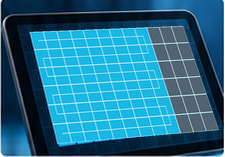
Illustration of covered and unvisited cells
Example from the synthetic session

54 unique cells ÷ 72 × 100 = 75%.Repeated samples do not add new coverage.

Questions, Answered

Does 100% prove the touchscreen works?

No. It only means every grid cell received a qualifying browser position during this session. It does not certify hardware or test the entire physical screen.

Can I use a mouse or stylus?

Mouse check is a separate mode. Touch mode excludes mouse and pen events. Keyboard inspection adds no coverage.

Why does rotating the device clear my session?

Rotation and surface resizing change the cell geometry. Start a fresh session so the observation remains consistent.

How is my data used?

Session positions stay in this browser unless you choose to export or share them. The shared record contains normalized positions, relative times, input mode, and an optional title; no device identifiers are included.
A route. A record.
A clearer retest.

Trace the pad, replay the received positions,
and show a helper the areas still untested.

Start a guided touch check
Touch trail on a tablet
Touchscreen Troubleshooting Quick Start Guide cover
Free PDF guide
FREE 12-PAGE PDF GUIDE

Make your next
check repeatable.

  • Run a careful screen check
  • Record browser observations
  • Know what tests cannot prove

Email signup and guide delivery are not available yet. No email addresses are collected.

Privacy Policy

Support TapCoverage

Donations are not connected yet. Thank you for using this free tool.